
Product Details

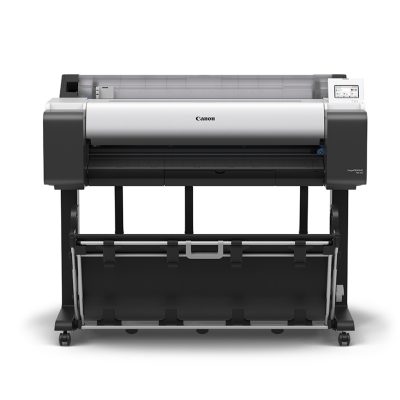
Canon imagePROGRAF TM-355 MFP Lm36
Product Details

Canon imagePROGRAF TM-355 MFP Lm36

1024x1024-canon-tm-355-a0-wide-format-printer-plotter-2
The Canon imagePROGRAF TM-355 MFP Lm36 is a high-performance large-format print and scan solution, designed for professionals in architecture, engineering, construction, and design. This 36-inch device combines exceptional printing quality with advanced scanning capabilities, offering precise, high-resolution output and vibrant colours using the LUCIA TD pigment ink system. Ideal for technical drawings, GIS maps, and posters, it delivers sharp lines and exceptional clarity even on uncoated media. Its compact, quiet design makes it perfect for office environments, while the intuitive touchscreen interface ensures easy operation. Equipped with advanced security features and robust media handling, the TM-355 MFP Lm36 is built to handle high-volume workloads with ease. It also integrates seamlessly with cloud-based workflows and comes with powerful software tools for streamlined print and scan management.

Toner Details:

2884C001AA Canon PFI-120MBK Matte Black Ink Tank – 130ml Cartridge
2885C001AA Canon PFI-120BK Black Ink Tank – 130ml Cartridge
2886C001AA Canon PFI-120C Cyan Ink Tank – 130ml Cartridge
2887C001AA Canon PFI-120M Magenta Ink Tank – 130ml Cartridge
2888C001AA Canon PFI-120Y Yellow Ink Tank – 130ml Cartridge
2889C001AA Canon PFI-320MBK Matte Black Ink Tank – 300ml Cartridge
2890C001AA Canon PFI-320BK Black Ink Tank – 300ml Cartridge
2891C001AA Canon PFI-320C Cyan Ink Tank – 300ml Cartridge
2892C001AA Canon PFI-320M Magenta Ink Tank – 300ml Cartridge
2893C001AA Canon PFI-320Y Yellow Ink Tank – 300ml Cartridge

Features

  • New magenta ink for brighter reds
  • Pigment based ink for long lasting smudge resistant prints
  • 300ml/130ml ink tank size
  • Auto detection of media type
  • USB direct print

Additional Information

Get a Quote

For more information about this product please get in touch.

Scanner Technology
Scan Technology
  • SingleSensor with multiple LED Illumination
Maximum Resolution (dpi)
  • 600 dpi
Scan Speed

Copy:

  • 300/300 dpi Draft = 1 ips colour, 3 ips mono
  • 300/600 dpi Standard = 1 ips colour, 3 ips mono
  • 600/600 dpi Best = 0.5 ips colour, 1.5 ips mono

Scan:

  • 200 dpi Draft = 1 ips colour, 3 ips mono
  • 300 dpi Standard = 0.5 ips colour, 1.5 ips mono
  • 600 dpi Best = 0.33 ips colour, 1 ips mono
Scan Modes
  • Scan to USB – RGB/Greyscale/BW, TIFF (No ScanApp)
  • Scan to USB – RGB/Greyscale/BW, JPG, PDF, PDF/A, M-PDF (ScanApp available)
  • Scan to PC – RGB/Greyscale/BW, Tiff, JPEG, PDF, PDF/A, TiffG4, M-PDF
  • Copy – RGB/Greyscale/BW
  • Copy & Archive – (Combination of Copy and Scan to PC above).
  • Cloud connectivity is achieved by a link to Canon’s Direct Print & Share
  • PRINT is achieved by using Canon’s Direct Print & Share
Paper Path
  • Face up, rear exit. Forward document transport only
  • Document return guide(s) included
Maximum Scan Width
  • 36”/914.4mm
Minimum Scan Width
  • 6″/152.4mm
Maximum Document Width
  • 38”/965.2mm
Maximum Scan Length
  • 109”/2768mm
Document Thickness
  • Designed to scan Canon iPF printer CAD paper
  • Min = 0.07mm
  • Max = 0.8mm
Scan Accuracy
  • Accuracy 0.2% +/-1 pixel
Interface USB
  • USB2, 128 GB FAT32
Scan to Network
  • ScanApp – Sets scan directory
  • Minimum PC specification: Windows 7/8/10 – 32bit, 100Mbs Ethernet, Intel Celeron, Core-Duo, Core-2-Duo or 2.8 GHz Hyper-Threading (HT) or AMD Dual-Core processors, 2 GB RAM • High speed 7,200 rpm Serial ATA (SATA) HDD with minimum 2 GB for applications and 20 GB free for images
  • Suggested PC specification: Windows 7/8/10 – 64bit, GB Ethernet, Intel i3,i5 or i7 processors, 4 GB RAM, High speed 7,200 rpm Serial ATA (SATA) HDD with minimum 2 GB for applications and 20 GB free for images
Languages
  • ScanApp
  • English/French/German/Italian/Spanish/Simplified Chinese/Traditional Chinese/Korean/Russian/Portuguese/ Japanese/Czech/Polish
Control Panel
  • 3.5” touch screen display
Weight of Scanner
  • 6.56kg (14.5lbs) without Doc return guide
Dimensions (W x D x L)
  • Width: 1238mm
  • Height 131mm
  • Depth: Without Doc Return Guide – Paper tray folded: 146mm; Without Doc Return Guide – Paper Tray flat: 193mm; With Doc Return Guide – Paper tray folded: 206mm; With Doc Return Guide – Paper Tray flat: 253mm
Compliances
  • Europe: CE mark
  • Other Countries: CB certification
What’s in the Box?
  • Lm36 scanner
  • Printer mounting brackets, fixings & 3mm tool
  • 2 feet for desktop use
  • 2 paper edge guides
  • 3 Document return guides
  • Calibration target
  • CD for ScanApp software and PDF documentation
  • Lm36 Scanner User Manual per language and Quick Start Guide
  • Lm36 Scanner Quick Start Guide
  • Ethernet cable (2 meter)
  • Power Supply
  • Regional – Mains power cord(s) (2 meter)
Printer Technology
Printer Type
  • 5 Colours 36″
Print Technology
  • Canon Bubblejet on Demand 6 colours integrated type (6 chips per print head x 1 print head)
Print Resolution
  • 2,400 x 1,200 dpi
Number of Nozzles
  • Total: 15360 nozzles
  • MBK: 5120 nozzles
  • BK, C, M, Y: 2560 nozzles each
Line Accuracy
  • ±0.1% or less
  • User adjustments necessary. Printing environment and media must match those used for the adjustments
Nozzle Pitch
  • 1,200 dpi x 2 lines
Ink Droplet Size
  • minimum 5pl per colour
Ink Capacity
  • Bundled Starter Ink: 490ml (130ml for MBK, 90ml x 4 for BK, C, M, Y)
  • Sales Ink: 300/130ml (MBK, BK, C, M, Y)
Ink Type
  • Pigment inks: 5 colours MBK/BK/C/M/Y
OS Compatibility
  • 32 Bit: Windows7, Windows 8.1, Windows 10
  • 64 Bit: Windows 7, Windows 8.1, Windows 10, Windows 11, Windows Server 2008R2, 2012, 2012R2, 2016, 2019, 2022
  • Apple Macintosh: macOS 10.15.7~macOS 13
Other Supported Job Submission Protocols
  • Apple AirPrint
Printer Languages
  • HP-GL/2, HP RTL, JPEG (Ver. JFIF 1.02), CALS G4 (submission via FTP only)
Standard Interfaces
  • USB A Port: N/A
  • USB B Port: Hi-Speed USB
  • Ethernet: IEEE802.3ab(1000base-T), IEEE802.3u(100BASE-TX)/IEEE802.3 (10BASE-T)
  • Wireless LAN: IEEE802.11n/IEEE802.11g/IEEE802.11b

*Please refer to user manual how to activate/deactivate the wireless LAN

Memory
Standard Memory
  • 128 GB (Physical memory 2 GB)
  • Expansion slot: No
Hard Drive
  • 500 GB (Encrypted)
Print Speed
CAD Drawing
  • Plain Paper (A1): 0:17 (Fast Economy Mode) 3.2 ppm
  • Plain  Paper (A0): 0:32 (Fast Economy Mode); 0:41 (Fast); 1:08 (Standard)
Poster
  • Plain Paper (A0): 0:37 (Fast Economy Mode); 0:43 (Fast); 1:18 (Standard)
  • Heavy Coated Paper (A0): 1:40 (Fast); 2:33 (Standard)
Media Handling
Media Feed and Output
  • Roll Paper: One Roll, Upper-loading, Front Output
  • Cut Sheet: Upper-loading, Front Output (Manual feed using media locking lever)
Media Width
  • Roll Paper: 203.2 – 917mm
  • Cut Sheet: 210 – 917mm
Media Thickness
  • Roll/Cut: 0.07mm – 0.8mm
Minimum Printable Length
  • Roll Paper: 203.2mm
  • Cut Sheet: 279.4mm
Maximum Printable Length
  • Roll Paper: 18m (varies according to the OS and application)
  • Cut Sheet: 1.6m
Maximum Media Roll Diameter
  • 150mm
Media Core Size
  • Internal diameter of roll core: 2″/3″
Margins Recommended Area
  • Roll Paper: Top: 20mm, Bottom: 3mm, Side: 3mm
  • Cut Sheet (AppleAirPrint): Top: 20mm, Bottom: 31mm, Side: 3mm
  • Cut Sheet (Others): Top: 20mm, Bottom: 20mm, Side: 3mm
Margins Printable Area
  • Roll Paper: Top: 3mm, Bottom: 3mm, Side: 3mm
  • Roll Paper (borderless): Top: 0mm, Bottom: 0mm, Side: 0mm
  • Cut Sheet (AppleAirPrint): Top: 3mm, Bottom: 12.7mm, Side: 3mm
  • Cut Sheet (Others): Top: 3mm, Bottom: 20mm, Side: 3mm
Media Feed Capacity
  • Roll Paper: One roll
  • Cut Sheet: 1 sheet
Borderless Printing Width (Roll Only)
  • [Recommended] 515mm (JIS B2), 594mm (ISO A1), 10″, 14″, 17″, 24″
  • [Printable] 257mm (JIS B4), 297mm (ISO A3), 329mm (ISO A3+), 420mm (ISO A2), 515mm (JIS B3), 8″, 12″, 15″, 16″, 18″, 20″, 22″, 300mm, 500mm, 600mm
  • Other than above, free size borderless printing is supported on only roll paper by user definition
Maximum Number of Delivered Prints
  • Standard position – 1 sheet
  • Folding position: Plain paper 20 sheets on A1 portrait / A0 portrait
  • Flat position: Plain paper 20 sheets on A2 landscape / A1 landscape (exclude strong curled position)
Power and Operating Requirements
Power Supply
  • AC 100-240 V (50-60 Hz)
Power Consumption
  • Operation: 69 W or less
  • Sleep mode: 2.2 W or less
  • Default setting for the time to enter the Sleep mode: Approx. 5 minutes
  • Power off: 0.1 W or less
Operating Environment
  • Temperature: 15~30℃, Humidity: 10~80% RH (no dew condensation)
Acoustic Noise (Power/Pressure)
  • Operation: Approx. 41 dB(A) (Standard Plain Paper, Standard Mode, Line Drawing/Text Mode) (measured based on ISO7779 standard)
  • Standby: 35 dB(A) or less
  • Operation: 6.2 Bels or less (Standard Plain Paper, Standard Mode, Line Drawing/Text Mode) (measured based on ISO7779 standard)
Regulations
  • CE mark, UKCA mark
Environment Certificates
  • CB certification, EPEAT GOLD
Dimensions and Weight
Physical Dimensions and Weight (W x D x H)
  • Main unit with stand
  • 1285 x 885 x 1060mm (operation panel is not tilted up/basket opened)
  • 1285 x 756 x 1060mm (operation panel is not tilted up/basket closed)
  • 63.8kg (including Roll Holder Set, excluding ink and print head)
Packaged Dimensions and Weight
  • Printer (main unit with stand and pallet): 1462 x 1122 x 801mm, 113kg
What’s Included
What’s in the Box?
  • Printer, Printer Stand, 1 Print head, Power Cable, 1 Set of starter ink tanks, Installation Guide, Safety/Standard Environment leaflet, LFP Eur Address Sheet, Important Information Sheet, Stack Printer Stand Setup Guide, Notice for PosterArtist WEB
Software Included
  • Software available as Download from Web
Options
Optional Items
  • 2″/3″ Roll Holder: RH2-35
  • IC Card Reader Holder: RA-02
Consumables
User Replaceable Items
  • Ink Tank: M:PFI-321(300ml) / PFI-121(130ml), MBK/BK/C/Y:PFI-320(300ml) / PFI-120(130ml)
  • Print Head: PF-06
  • Cutter Blade: CT-08
  • Maintenance Cartridge: MC-31
Onboarding

How We Work

01.

Discover Your Needs

We start by understanding your unique requirements and challenges through a comprehensive consultation.

02.

Design a Bespoke Solution

Our experts develop a tailored solution that perfectly fits your needs, ensuring optimal efficiency and results.

03.

Deliver and Support

We implement your custom solution seamlessly and provide ongoing support to ensure your continued success.

Get in touch

Ready to go?

Our team will recommend the most cost-effective and efficient solution for your business. Get in touch today to discuss your options.